


Jamf Parent app available for families with SCEA-Managed iPads
If your child has received a SCEA-managed iPad for the 2026 school year, the Jamf Parent app offers additional parental controls for at-home device use.
Download free today in the Apple App Store and Google Play store. Links below.





Detailed device rollout timeline is availabe here. For any further questions about Northshore Christian Grammar School’s rollout, please contact the Principal, Mr Stuart Chisholm.
Click Here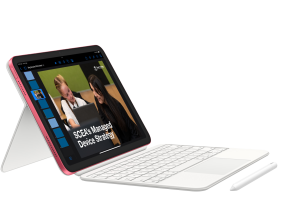
(applies to all families)
(applies to all families)
What is the Managed Device Program?
A SCEA program that provides every student with a device configured for learning only. Teachers control when and how devices are used so classrooms stay safe, focused, and productive.
Why is SCEA moving from BYOD?
The BYOD model (introduced from Year 5 or Year 7 in many schools) created high costs, inconsistent devices, and difficulties for teachers and families. The Managed Device Program addresses these issues by providing every student with the same device, configured for educational use only. This improves student safety, ensures equity, and supports stronger teaching and learning outcomes.
How will a SCEA-supplied device enhance security?
Every device will come pre-configured with enterprise-grade protections, including Jamf for device management, Cisco Umbrella for web filtering, Microsoft Defender for threat protection, and Apple Classroom for teacher oversight. Together these tools create a safer, well-managed digital environment by blocking harmful content, reducing distractions, and safeguarding students.
How will the Managed Device Program safeguard our children?
Devices are locked down for school use, reducing distractions such as gaming, scrolling, and social media. Teachers can guide screens in real time, and our IT team monitors device compliance. This structure helps protect students’ wellbeing while still giving them the benefits of quality technology for learning.
How does the Managed Device Program provide consistency and reliability?
Every student in a year group that is participating in the Managed Device Program will have the same device, software, and setup. This reduces classroom interruptions caused by incompatible systems, troubleshooting, or forgotten chargers, and allows teachers to focus on teaching.
Why are the devices Apple and not Windows or Chromebooks?
After research, consultation, and evaluation, SCEA selected Apple because of their durability, integration with education software, and classroom management features (e.g. Apple Classroom). Apple devices are also supported by strong warranty programs and our education partner, Winthrop Australia.
What is meant by a “Focused Learning Environment”?
With managed devices, classrooms are free from the distractions of games, social media, and unfiltered internet browsing. Teachers can use Apple Classroom to monitor and redirect student use, keeping lessons focused and productive.
Will this mean less face-to-face teaching and more “screen time” for my child?
No. Devices are not a substitute for teachers. At SCEA, we believe the most powerful learning happens through personal interaction between students and teachers. Devices will only be used when they genuinely add value, for example, to create, collaborate, research, or practice digital skills. Teachers will continue to lead lessons directly, using technology as an educational tool to strengthen learning, not dominate it.
How will students be using their device during the school day?
Devices will be used as a tool to support learning: for research, writing, collaboration, creativity, and accessing resources. They are not used all day or in every lesson, but at times where they add value to face-to-face teaching.
Will students continue with handwriting?
Yes. Handwriting remains an essential skill, and students will continue to use exercise books and handwritten assessments where appropriate. Devices complement, not replace, traditional methods of learning.
Why are the devices Apple and not Windows or Chromebooks?
After research, consultation, and evaluation, SCEA selected Apple because of their durability, integration with education software, and classroom management features (e.g. Apple Classroom). Apple devices are also supported by strong warranty programs and our education partner, Winthrop Australia.
Is 128GB for iPads and 256GB for MacBooks enough storage?
Yes. For school use, 128GB on an iPad and 256GB on a MacBook provide more than enough space for apps, assignments, projects, and media. Students also have access to cloud storage through Microsoft 365 and OneDrive, meaning large files and backups don’t need to be stored on the device itself. In addition, the MacBooks supplied through the program for Years 10 – 12 include 16GB of RAM, ensuring smooth performance even when multiple applications are open, so students can learn, create, and collaborate without slowdowns.
How do I collect my child’s device?
Devices will be distributed at the beginning of the school year as part of student induction. Families with a child in a participating year group will receive clear instructions in December, including dates, times, and locations for device collection. Our IT team will assist with setup so that every device is ready for use in the classroom on day one.
Will the devices work at home as well as at school?
Yes. Students in Years 7 – 12 can use their device at home for study, homework, and projects. Devices remain enrolled as SCEA-managed devices, so the same safeguards and restrictions apply at home. Primary students will not take iPads home as they will remain classroom devices.
How do students charge their devices?
Students are expected to bring their devices fully charged each day. Battery life on the chosen Apple devices is sufficient for a full school day. Charging facilities at school (other than in the Primary classrooms which have charging stations) will be limited to emergency use.
How regularly will students receive a new device?
From 2026, Year 7 students are issued with an iPad which they use until the end of Year 9, when it is to be return to SCEA in good working condition and replaced with a MacBook for Year 10 – 12. Year 10 students will receive a MacBook which they may permanently keep after their Year 12 graduation.
What if my child already has a new device?
During the transitional period (2026 – 2028), families who meet the requirements of SCEA’s Transitional Hardship Pathway may request to use an existing parent-supplied Apple device instead of joining the lease program.
- The device must meet SCEA’s minimum specifications.
- It must be reset to factory settings, enrolled, and managed under the SCEA system.
- An annual Technology Support Fee will apply.
- Devices that are not Apple or do not meet the minimum specifications are not eligible and cannot be used.
From 2029 onwards, all students will be required to use a SCEA-provided device through the Managed Device Program.
Our Transitional Hardship Pathway is available to support families in need. For more information, please click here.
Can I buy the same Apple device outside the program and opt-in?
This option is only available if your child’s year group is participating in the Managed Device Program and only during the transitional period (2026–2028) for families facing genuine financial hardship.
- The device must be an Apple model that meets SCEA’s minimum specifications.
- It must be reset to factory settings, enrolled, and managed under the SCEA system.
- An annual Technology Support Fee applies: $60 for iPads or $90 for MacBooks.
- Devices that are not Apple or do not meet specifications are not eligible.
From 2029 onwards, all students will be required to use a SCEA-provided device through the Managed Device Program.
Our Transitional Hardship Pathway is available to support families in need. For more information, please click here.
Is a screen protector worth the investment?
Yes, screen protectors are strongly recommended. While all devices come with protective cases, screen protectors provide an extra layer of safety against scratches and drops.
What if my child forgets to bring their device to school or forgets to charge it?
It is an expectation that students arrive at class with their device fully charged and ready to use. SCEA cannot provide loan devices for students who leave their device at home or forget to charge it. Families are encouraged to establish good routines at home so devices are always ready for learning.
Who owns and controls the leased devices?
Under the SCEA leased device program, all devices remain the property of SCEA, which allows us to manage software, updates, and settings so they are used solely as learning tools. Students in Years 7 – 9 are provided with a leased iPad, which must be returned to SCEA at the end of Year 9 or earlier if the student leaves. Students in Years 10 – 12 are provided with a leased MacBook, which remains SCEA property during the program but will be formally gifted to the student upon successful completion of Year 12, provided all outstanding school fees and charges have been paid.
Can my child install apps from the Apps Store?
No. Students do not have access to the App Store. Only approved educational apps will be installed by SCEA through our device management system.
Can we use third-party accessories?
No. Devices must remain in the protective cases provided, and only approved accessories may be used.
Are SCEA-leased devices covered by warranty?
Yes. All SCEA-leased devices are covered by AppleCare+ for the duration of the lease.
What does AppleCare+ include?
AppleCare+ covers most manufacturer faults and includes reduced service fees for accidental damage.
How will SCEA support my child if their SCEA-leased device needs repair?
Our ICT Team will manage all warranty and repair claims, provide temporary loan or replacement devices where eligible, and ensure classroom learning is not disrupted.
What happens if a SCEA-leased device is damaged and not covered by warranty?
If a SCEA-leased device requires repair, SCEA’s IT Team will provide (subject to availability):
- A loan or replacement iPad for students leasing iPads.
- A loan or replacement MacBook Air for students leasing laptops.
This minimises disruption to learning while the device is repaired.
What happens if the device, pen, or case of a SCEA-leased are damaged or not working?
Devices are covered by AppleCare+ warranty for three years, which includes repairs or replacement for most hardware faults and limited accidental damage incidents. If a device develops a fault, it will be repaired or replaced quickly by SCEA’s IT team and Winthrop Australia. If the device or accessories are damaged and not covered by warranty, the following costs will be added to the school fees:
Repairs for SCEA-leased devices are coordinated under AppleCare+. Standard AppleCare+ service fees apply and are payable by parents/guardians per incident (as outlined in the table below). In addition, damaged or missing accessories will be charged at replacement cost.
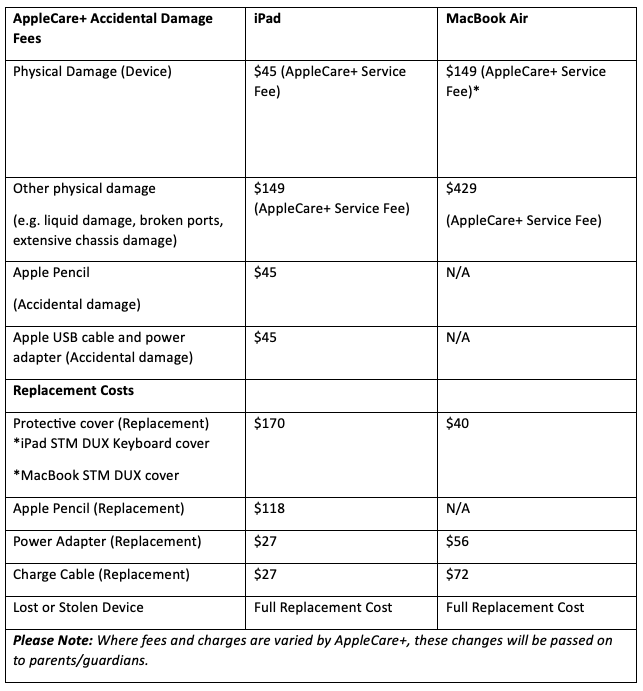
Malicious or repeated damage, lost, or stolen devices are the responsibility of families. In these cases, costs may apply in line with program guidelines. Protective cases are included to reduce the risk of breakages.
If my child has a SCEA-leased device, do I have to insure the device?
While AppleCare+ provides cover for accidental damage to SCEA-leased devices such as cracked screens or liquid spills, AppleCare+ does not cover loss or theft.
For SCEA-leased devices, we strongly recommend you check whether your home contents policy covers school devices, or consider arranging specific device insurance. Some insurers and banks offer low-cost add-on policies for portable electronics. Please speak with your insurance provider to confirm the best option for your family.
Does SCEA offer additional insurance options?
Yes. Families who prefer additional insurance have the option to take out additional insurance for their child’s Managed Device against theft and loss. SCEA is able to offer the following additional insurance option through Protecsure:

The cost to parents is a single charge and covers the full three-year term of the lease.
What is covered by Protecsure Theft and Loss insurance?
- Fire
- Theft – needs to be in a secure location (Covered in the school premises and supervised excursion – the equipment needs to be supervised in public)
- Lost in transit (Only on a mode of public transport)
- Stolen from a locked vehicle
- Coverage anywhere in Australia
- Overseas cover (28 days any one trip)
- A maximum of two claims can be made during the life of the policy.
Important information
- If Protecsure deems a claim ineligible for approval, parents will be liable for the replacement cost of the device.
- By taking out Protecsure insurance, parents authorise SCEA to lodge an insurance claim for their child’s device in the event of a claimable incident.
- By taking out Protesure insurance, parents agree to receive and pay the invoice for the set excess amount for any claim made by SCEA for their child’s device.
What if covering the cost of a SCEA-leased device in Year 7 or Year 10 is difficult for our family?
At SCEA, we never want financial pressures to prevent a child from learning or feeling included. We recognise that some families may face genuine hardship, and we are committed to working alongside you so that every student has access to a safe and reliable device.
Our Transitional Hardship Pathway is available to support families in need. For more information, please click here.
We’ve seen cheaper devices in stores. Why not just buy one of those?
Retailers sometimes advertise short-term sales or run-out discounts, but these prices are temporary, vary widely, and usually don’t include everything your child needs for school. By contrast, SCEA’s bundles are based on Apple’s best available education pricing, secured through our system-wide buying power, and include much more than just the device:
- Essential accessories (keyboard case, charger, stylus if required)
- Three years of AppleCare+ warranty
- Apple Classroom for teacher oversight
- Device management software (Jamf)
- Cybersecurity software and compliance monitoring
- Full device setup before your child receives it
- Local technical support through SCEA and Winthrop Australia
- A loan device if your child’s device is damaged and under repair
Retail devices may look similar but often do not include these accessories, protections, or services.
Finally, instead of paying the full cost upfront, SCEA allows parents to spread the cost over a three-year term, making the program both affordable and predictable.
Will the cost change for future students?
Annual fees are based on bulk-negotiated education pricing. While fees may be reviewed annually and may be subject to inflation, they are designed to remain predictable and stable for families.
What happens if my child leaves SCEA?
If a Secondary / Senior School student leaves SCEA before completing the three-year lease cycle, their SCEA-leased device must be returned to SCEA in good working condition. Lease payments already made are non-refundable. This ensures fairness across the program and helps maintain consistency for all families.
Why is there a cost difference between Primary, Years 7–9, and Years 10–12?
The difference reflects the type of device and the bundled support. Primary students use shared iPads that are classroom devices and remain at school, so the cost is lower. Years 7 – 9 students are issued SCEA-leased iPads with additional accessories and 3-years of AppleCare+. Years 10 – 12 students receive higher-specification SCEA-leased MacBooks designed for senior learning, with additional accessories and 3-years of AppleCare+, which they keep after graduation (where all school fees are paid). The costs also include technical support, Apple Classroom software, device management software, and cybersecurity protections across all devices.
What devices will Primary students use?
For 2026, shared classroom iPads will be provided at a 2:1 student-to-device ratio in Kindy to Year 4. Years 5 to 6 will be a SCEA-managed iPad at a 1:1 student-to-device ratio.
Can Primary students take devices home?
No. iPads remain at school to support classroom learning.
Why are Primary devices shared rather than 1:1?
Younger students benefit from guided and balanced use of technology. Shared access helps avoid overuse while still supporting digital literacy. Northshore offers 1:1 student-to-device ratio in Years 5– 6.
Is there an annual cost?
Yes. $95 per year for a SCEA-managed shared iPad at a 2:1 student-to-device ratio, and $190 per year for a SCEA-managed iPad at a 1:1 student-to-device ratio. This covers the provision of a shared or exclusive iPad 11-inch 128GB, keyboard track-pad case, Apple Classroom software, device management software, security software, technical support, and access to a loan device (where available) when a student’s device is not working or under repair.
My child is starting mid-year in Year 7–9? What device is required?
2026
- Year 7: Managed Device Program – leased iPad provided by SCEA.
- Year 8: BYOD – families must supply their own BYOD Apple or Windows device.
- Year 9: BYOD – families must supply their own BYOD Apple or Windows device.
2027
- Year 7: Managed Device Program – leased iPad provided by SCEA.
- Year 8: Managed Device Program – leased iPad provided by SCEA.
- Year 9: BYOD – families must supply their own BYOD Apple or Windows device.
2028
- Year 7: Managed Device Program – leased iPad provided by SCEA.
- Year 8: Managed Device Program – leased iPad provided by SCEA.
- Year 9: Managed Device Program – leased iPad provided by SCEA.
What is included in the Year 7 iPad bundle?
Each bundle includes an iPad 11-inch 128GB, keyboard case with trackpad and stylus holder, Apple Pencil USB-C (engraved), AppleCare+ (3 years), Apple Classroom software, device management software, security software, technical support, and access to a loan device (where available) when a student’s device is not working or under repair.
What is the IT Levy for parents in Years 7 – 9?
The annual cost for a SCEA-leased iPad bundle for Year 7 in 2026 is $345.
Why is the keyboard case with trackpad and stylus holder required?
It ensures students have a complete setup for typing, research, and handwriting tasks. The trackpad and stylus holder also make the device more versatile for schoolwork.
Can students bring more than one device to school?
No. To avoid distraction and ensure consistency, only the SCEA-leased device may be used at school.
My child is starting mid-year. What device is required?
New students coming into Year 7 from 2026 will receive a SCEA-leased iPad.
What happens at the end of Year 9?
Students return their iPads to SCEA in good working condition. They receive a MacBook bundle going into Year 10 to assist their upper secondary school learning.
What if my child leaves before Year 10?
The SCEA-leased iPad must be returned to SCEA in good working condition. Lease payments are not refundable.
Can I opt-in to the Managed Device Program outside of the Year 7 entry point?
No. Students must enter at the designated year level.
Will the SCEA-leased device work at home?
Yes. The SCEA-leased device is managed both at school and at home, with safeguards, apps, and filters applied consistently.
Families with students in Years 7-9 receiving a SCEA-managed iPad may also download the Jamf Parent app for free, which offers additional parental controls for at-home device use. Please note that the parental controls will work alongside the managed software, not replace it.
My child is starting mid-year in Year 10–12? What device is required?
2026
- Year 10: Managed Device Program – leased MacBook provided by SCEA.
- Year 11: BYOD – families must supply their own BYOD Apple or Windows device.
- Year 12: BYOD – families must supply own BYOD Apple or Windows device.
2027
- Year 10: Managed Device Program – leased MacBook provided by SCEA.
- Year 11: Managed Device Program – leased MacBook provided by SCEA.
- Year 12: BYOD – families must supply their own BYOD Apple or Windows device.
2028 onwards
- Year 10: Managed Device Program – leased MacBook provided by SCEA.
- Year 11: Managed Device Program – leased MacBook provided by SCEA.
- Year 12: Managed Device Program – leased MacBook provided by SCEA.
What is included in the Year 10 MacBook bundle?
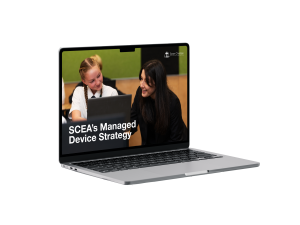
Each bundle includes a MacBook Air M4 (16GB RAM, 256GB SSD), protective case, AppleCare+ (3 years), Apple Classroom software, device management software, security software, technical support, and access to a loan device (where available) when a student’s device is not working or under repair.
What is the IT Levy for parents in Years 10 – 12?
The annual cost for a SCEA-leased MacBook bundle for Year 7 in 2026 is $595.
Can I opt-in to the Managed Device Program outside of the Year 10 entry point?
No. Students must enter at the designated year level.
Is a 256GB hard drive sufficient?
Yes. With cloud storage and school-managed apps, 256GB is more than adequate for student needs across Years 10–12.
What happens at the end of the three-year lease?
Provided all fees are paid, students keep their MacBook after Year 12 graduation.
If my child leaves before Year 12, what happens to their MacBook?
For students in Years 10 – 12, the MacBook is only gifted at graduation when all school fees and charges are paid. If a student leaves SCEA before Year 12, the device must be returned to the school in good working condition.
Can I opt-in outside of the Year 10 entry point?
No. Students must enter at the designated year level.
Will the SCEA-leased device work at home?
Yes. The SCEA-leased device is managed both at school and at home, with safeguards, apps, and filters applied consistently.
